

5
JOD19
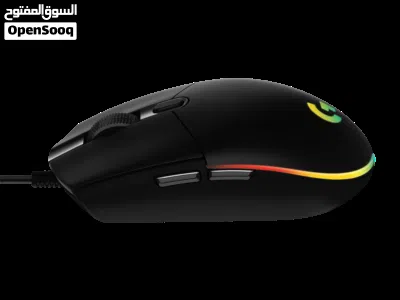
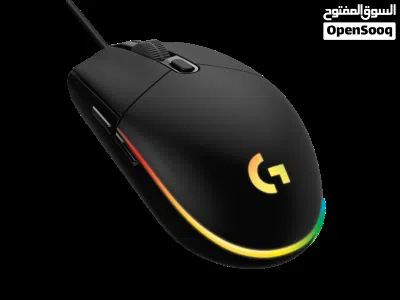
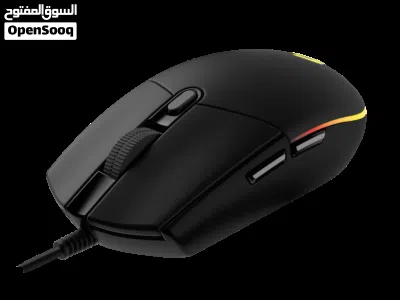
Logitech G102 Light Sync Gaming Wired Mouse ماوس لوجيتيك جديد
- الحيالجاردنز
- المدينةعمان
- القسم الفرعيلوحات مفاتيح وفأرات ألعاب
- القسمألعاب وألعاب الفيديو
- إعلان رقم281408588
- تاريخ النشر19-05-2026
الوصف
Logitech G102 Light Sync Gaming Wired Mouse with Customizable RGB Lighting, 6 Programmable Buttons, Gaming Grade Sensor, 8 k dpi Tracking,16.8mn Color, Light Weight (Black) (910-005802)
8,000 DPI sensor – The gaming-grade sensor responds precisely to your movements; Colourful LIGHTSYNC RGB – Play in colour with our most vibrant LIGHTSYNC RGB featuring colour wave effects that are customisable across 16.8 million colours
Classic, gamer-tested design – Play comfortably and with total control. The simple 6-button layout and classic gaming shape form a comfortable, time-tested and loved design
Mechanical spring button tensioning – Primary buttons are mechanical and tensioned with durable metal springs for reliability, performance and an excellent feel
Customise the settings to suit the sensitivity you like with Logitech G HUB gaming software and cycle easily through up to 5 DPI settings
Style Name: G102 2nd Gen; Hardware Platform: Gaming Console
Make the most of play time with G102—a gaming mouse in a variety of vibrant colors. With LIGHTSYNC technology, a gaming-grade sensor and a classic 6-button design, you’ll light up your game and your desk
READY TO PLAY
Make the most of your game time with G102 gaming mouse, featuring LIGHTSYNC technology, a gaming-grade sensor and a classic 6-button design. Light up your game ... and your desk.
Choose from vibrant animations, game- and media-driven settings, or program your own from approximately 16.8 million colors.1Advanced features require Logitech G HUB software. Download free at LogitechG.com/downloads.
Get accurate cursor tracking and responsive performance thanks to a gaming-grade sensor. With adjustable sensitivity from 200-8,000 DPI, pick the right level that fits your play preference. Use Logitech G HUB software to program up to 5 presets.2Advanced features require Logitech G HUB software. Download free at LogitechG.com/downloads.
The classic six-button design provides both comfort and confidence so you can explore, cast spells, and play just like you want. Use Logitech G HUB software to assign in-game commands, system controls, or key binds to buttons and simplify your gameplay.
Primary left and right buttons have a Logitech G exclusive metal spring button tensioning system which delivers precise button actuation and consistent experience—click after click.
G102 is designed to work seamlessly in any system, but if you’re looking to fine-tune controls, free-to-download customization software is easy to use and set up. Logitech G HUB software is a complete customization suite that, lets you personalize lighting, sensitivity, and button commands on your G102 mouse.3Advanced features require Logitech G HUB software. Download free at LogitechG.com/downloads.
Button Assignments
Assign system commands, shortcut keys, and keyboard commands to the 6 buttons. You can also create powerful macros, which let you input sequences of commands in a row that execute every time you click the assigned button.
Set your Sensitivity
G102 sensor is capable of sensitivity up to 8,000 DPI (dots per inch). G102 lets you choose sensitivity settings as easy as sliding a scroll bar. Set up to 5 levels and cycle through them with the press of a button. It’s great for games that have different modes or levels that might require more control, like a sniper scope or a speed clicking level.
Onboard Memory
When you take your G102 with you, your custom settings can come along. By saving your preferences to the onboard memory using Logitech G HUB device settings you can use it on other computers with no need to install software or reconfigure your settings. Plug and play your way.
8,000 DPI sensor – The gaming-grade sensor responds precisely to your movements; Colourful LIGHTSYNC RGB – Play in colour with our most vibrant LIGHTSYNC RGB featuring colour wave effects that are customisable across 16.8 million colours
Classic, gamer-tested design – Play comfortably and with total control. The simple 6-button layout and classic gaming shape form a comfortable, time-tested and loved design
Mechanical spring button tensioning – Primary buttons are mechanical and tensioned with durable metal springs for reliability, performance and an excellent feel
Customise the settings to suit the sensitivity you like with Logitech G HUB gaming software and cycle easily through up to 5 DPI settings
Style Name: G102 2nd Gen; Hardware Platform: Gaming Console
Make the most of play time with G102—a gaming mouse in a variety of vibrant colors. With LIGHTSYNC technology, a gaming-grade sensor and a classic 6-button design, you’ll light up your game and your desk
READY TO PLAY
Make the most of your game time with G102 gaming mouse, featuring LIGHTSYNC technology, a gaming-grade sensor and a classic 6-button design. Light up your game ... and your desk.
Choose from vibrant animations, game- and media-driven settings, or program your own from approximately 16.8 million colors.1Advanced features require Logitech G HUB software. Download free at LogitechG.com/downloads.
Get accurate cursor tracking and responsive performance thanks to a gaming-grade sensor. With adjustable sensitivity from 200-8,000 DPI, pick the right level that fits your play preference. Use Logitech G HUB software to program up to 5 presets.2Advanced features require Logitech G HUB software. Download free at LogitechG.com/downloads.
The classic six-button design provides both comfort and confidence so you can explore, cast spells, and play just like you want. Use Logitech G HUB software to assign in-game commands, system controls, or key binds to buttons and simplify your gameplay.
Primary left and right buttons have a Logitech G exclusive metal spring button tensioning system which delivers precise button actuation and consistent experience—click after click.
G102 is designed to work seamlessly in any system, but if you’re looking to fine-tune controls, free-to-download customization software is easy to use and set up. Logitech G HUB software is a complete customization suite that, lets you personalize lighting, sensitivity, and button commands on your G102 mouse.3Advanced features require Logitech G HUB software. Download free at LogitechG.com/downloads.
Button Assignments
Assign system commands, shortcut keys, and keyboard commands to the 6 buttons. You can also create powerful macros, which let you input sequences of commands in a row that execute every time you click the assigned button.
Set your Sensitivity
G102 sensor is capable of sensitivity up to 8,000 DPI (dots per inch). G102 lets you choose sensitivity settings as easy as sliding a scroll bar. Set up to 5 levels and cycle through them with the press of a button. It’s great for games that have different modes or levels that might require more control, like a sniper scope or a speed clicking level.
Onboard Memory
When you take your G102 with you, your custom settings can come along. By saving your preferences to the onboard memory using Logitech G HUB device settings you can use it on other computers with no need to install software or reconfigure your settings. Plug and play your way.
علامات الذكاء الاصطناعي

إعلانات المتجر

سماعات رأس Joyroom JR-JH1 Type-C Hybrid ANC لاسلكية مزدوجة الاتصال بجهازين، لون أسود، قابلة للطي
الجاردنز . عمان
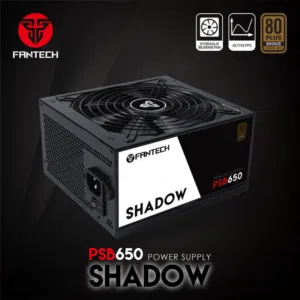
FANTECH PSB650 SHADOW POWER SUPPLY
الجاردنز . عمان
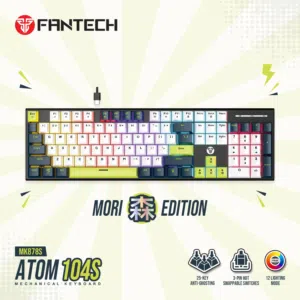
FANTECH ATOM104S MK878S MECHANICAL GAMING KEYBOARD MORI EDITION WHITE كيبورد فانتيك الجديد كليا
الجاردنز . عمان
DELL MS116 Optical Mouse ماوس ديل سلك اصلي
الجاردنز . عمان
راوتر re3000 cudy
مودمات وراوترات
,جديد
الجاردنز . عمان
Redragon P037 Meteor L Computer Keyboard Wrist Rest Pad ركاية يد نوعية ممتازة ريدراجون
الجاردنز . عمان

FANTECH ATOM81 MK875V2 MECHANICAL GAMING KEYBOARD – MIZU SERIES SKY BLUE كيبورد فانتيك ميزو 81
الجاردنز . عمان
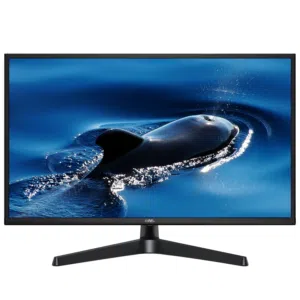
PC MONITOR UDORE 24INCH شاشة كمبيوتر 24 انش من مؤسسة الحزام الازرق بسعر حرق
أخرى ,24" ,جديد
الجاردنز . عمان
الأسئلة الشائعة
ما هو عدد الإعلانات في لوحات مفاتيح وفأرات ألعاب على السوق المفتوح؟
كيف يمكنني التواصل مع المُعلن بأمان؟
ما أفضل طريقة للقاء المُعلن والتأكد من جودة المنتج؟
مستخدم موثق

الحزام الأزرق BLUEBELTالردّ على الدردشة خلال 5 ساعات
3.8
06-09-2014
نصائح عامة
- اجتمع في الأماكن العامة فقط
- لا تقم بإرسال المال مسبقاً
- قم بتفقّد المنتج جيداً قبل شرائه
بيع كل شئ على السوق المفتوح
هل تود اضافة اعلان مماثل ؟
أضف إعلانك الآن

تريد مشاهدات أكثر؟
ميز وأعد نشر إعلانك
مشاهدة المزيد